Video server service
Contents
Requires EVA ICS Enterprise.
Video server service allows to record and manipulate streams from video sensors.
The video server can record local and remote video streams.
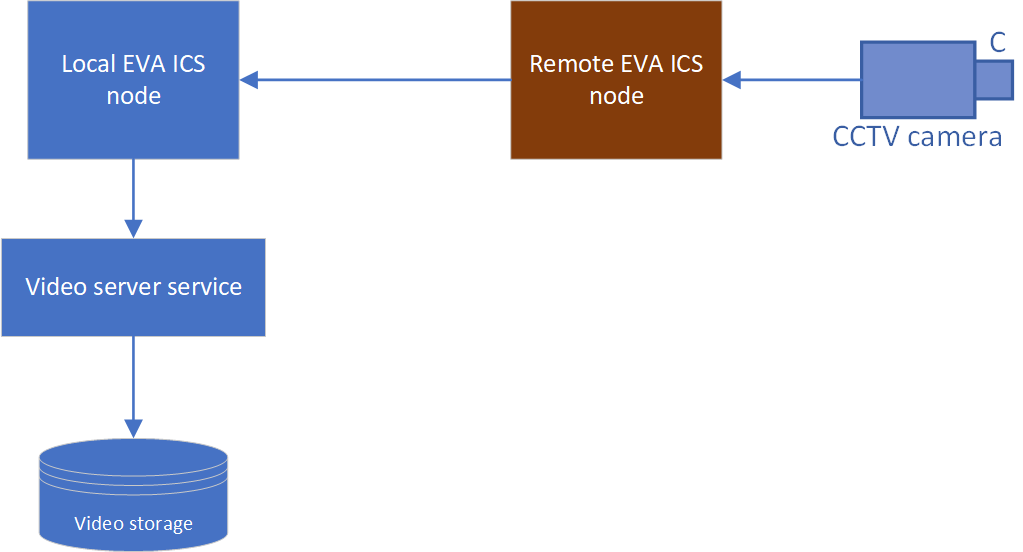
Functionality limitations
The service is not open-source and is included in EVA ICS Enterprise. Despite being a part of EVA ICS Enterprise, it is allowed to use service instances without a license, with the following limitations:
The maximum number of recorded streams is limited to 2
Preparing the system
The service requires GStreamer for proper functioning. Install GStreamer and its plugins (example for Debian/Ubuntu):
sudo apt install -y gstreamer1.0-tools \
        gstreamer1.0-plugins-base \
        gstreamer1.0-plugins-good \
        gstreamer1.0-plugins-bad \
        gstreamer1.0-plugins-ugly \
        gstreamer1.0-libav \
        gstreamer1.0-x \
        gstreamer1.0-alsa \
        gstreamer1.0-pulseaudio
Video storage
The video recording server requires PostgreSQL server.
Managing recorded streams
The stream recordings can be managed with eva-shell using the video rec command group:
eva video rec create - create a video recording
eva video rec list - list video recordings
eva video rec edit - edit a video recording configuration
eva video rec enable - enable (start) a video recording
eva video rec disable - disable (stop) a video recording
eva video rec destroy - destroy a video recording
eva video rec export - export video recording configuration(s) to a deployment file
eva video rec deploy - deploy video recording(s) from a deployment file
eva video rec undeploy - undeploy video recordings(s) using a deployment file
The streams can be also automatically deployed/undeployed using IaC and deployment.
Warning
When a video recording is destroyed, all recorded video data is permanently deleted.
The service also provides rich API for various automation scenarios.
Viewing video recordings
Use Operation centre to view video recordings. See OpCentre CCTV for more details.
Note
To view video recordings in OpCentre, the service instance must be deployed as eva.videosrv.default
Video recoding FPS
Video recording FPS (frames per second) is calculated dynamically based on the actual time difference between frames. In case of unstable communications between the source and the video server service, dynamic video recording rules, the FPS may be not convenient to playback. In such cases, it is possible to fix the FPS to a specific value, using the sensor metadata field:
# ....
meta:
  fps: 30 # fix the sensor FPS to 30 frames per second
# ....
Extracting video to a file
To extract a video recording from the database, EVA ICS GStreamer plugin can be used. The following example extracts a video recording for a stream sensor sensor:s0 from 2025-09-13 00:48:00 +02:00 to 2025-09-13 01:49:00 +02:00 and saves it to output.mkv file:
gst-launch-1.0 -v evavideosrvsrc \
 oid=sensor:s0 t-start='2025-09-13 00:48:00 +02:00' t-end='2025-09-13 01:49:00 +02:00' ! \
 matroskamux ! filesink location=output.mkv
Setup
Use the template EVA_DIR/share/svc-tpl/svc-tpl-videosrv.yml:
# Video server service
command: svc/eva-videosrv
bus:
  path: var/bus.ipc
config:
  buf_ttl_sec: 1
  # local database
  db: postgres:///eva?host=/var/run/postgresql&user=eva
  # remote database
  #db: postgres://USER:PASSWORD@HOST/DB
  # custom gstreamer decode pipelines (required for decoding methods, e.g. "rec.image")
  #decode_pipeline:
    #h264: h264parse ! openh264dec ! videoconvert
    #h265: h265parse ! avdec_h265 ! videoconvert
    #av1: av1dec ! videoconvert
  panic_in: 1
  queue_size: 8192
user: eva
Create the service using eva-shell:
eva svc create eva.videosrv.1 /opt/eva4/share/svc-tpl/svc-tpl-videosrv.yml
or using the bus CLI client:
cd /opt/eva4
cat DEPLOY.yml | ./bin/yml2mp | \
    ./sbin/bus ./var/bus.ipc rpc call eva.core svc.deploy -
(see eva.core::svc.deploy for more info)
EAPI methods
See EAPI commons for the common information about the bus, types, errors and RPC calls.
Crec.pull
Description |
Pull video recordings |
Parameters |
required |
Returns |
Cursor for pulling video frames with u field set to the cursor UUID |
Name |
Type |
Description |
Required |
i |
String |
Stream sensor OID |
yes |
t_start |
f64 |
Start timestamp (seconds since epoch) |
no |
t_end |
f64 |
End timestamp (seconds since epoch) |
no |
limit |
u32 |
Maximum number of frames to return |
no |
Nrec.pull
Description |
Pull next video frames from a cursor |
Parameters |
required |
Returns |
A next video frame from the cursor or null if the end is reached |
Name |
Type |
Description |
Required |
u |
String/Vec<u8> |
Cursor UUID |
yes |
rec.create
Description |
Create video recording |
Parameters |
required |
Returns |
nothing |
Name |
Type |
Description |
Required |
i |
String |
Stream sensor OID |
yes |
enabled |
bool |
Enable/disable recording |
no |
keep |
f64 |
Keep time (seconds) |
no |
rec.deploy
Description |
Deploy video recordings |
Parameters |
required |
Returns |
nothing |
Name |
Type |
Description |
Required |
video_recordings |
Vec<struct> |
Video recording configurations |
yes |
rec.destroy
Description |
Destroy a video recording |
Parameters |
required |
Returns |
nothing |
Name |
Type |
Description |
Required |
i |
String |
Stream sensor OID |
yes |
rec.disable
Description |
Disable video recording |
Parameters |
required |
Returns |
nothing |
Name |
Type |
Description |
Required |
i |
String |
Stream sensor OID |
yes |
rec.enable
Description |
Enable video recording |
Parameters |
required |
Returns |
nothing |
Name |
Type |
Description |
Required |
i |
String |
Stream sensor OID |
yes |
rec.get_config
Description |
Get video recording configuration |
Parameters |
required |
Returns |
Recording configuration |
Name |
Type |
Description |
Required |
i |
String |
Stream sensor OID |
yes |
Return payload example:
{
    "enabled": true,
    "keep": 86400000.0,
    "oid": "sensor:s0"
}
rec.image
Description |
Retrieve an image from a video recording |
Parameters |
required |
Returns |
Vec<u8> of the image data (PNG) or null if no image is found |
Name |
Type |
Description |
Required |
i |
String |
Stream sensor OID |
yes |
t |
f64 |
Timestamp (seconds since epoch) |
yes |
max_delta |
f64 |
Maximum time difference (seconds) from the requested timestamp |
no |
rec.info
Description |
Get video recording information |
Parameters |
required |
Returns |
Video recording information |
Name |
Type |
Description |
Required |
i |
String |
Stream sensor OID |
yes |
t |
f64 |
Timestamp (seconds since epoch) to get information for |
no |
limit |
u32 |
Maximum number of frames to analyze |
no |
Return payload example:
{
    "format": 10,
    "fps": 60,
    "height": 480,
    "width": 640
}
rec.list
Description |
List video recordings |
Parameters |
none |
Returns |
List of video recordings |
Return payload example:
[
    {
        "enabled": true,
        "keep": 86400000.0,
        "oid": "sensor:s0"
    },
    {
        "enabled": false,
        "keep": 30.0,
        "oid": "sensor:s1"
    }
]
rec.segmented
Description |
Retrieve a segmented video from a video recording |
Parameters |
required |
Returns |
Array of frames with metadata. The first array element is always a key frame at or after the requested timestamp. The frames are returned either until the next key frame or until the limit_max is reached. If limit_max is not specified, it is set as limit_min + 1000. |
Name |
Type |
Description |
Required |
i |
String |
Stream sensor OID |
yes |
t |
f64 |
Timestamp (seconds since epoch) |
yes |
limit_min |
u32 |
Minimum number of frames to include in the segment |
yes |
limit_max |
u32 |
Maximum number of frames to include in the segment |
no |
Return payload example:
[
    {
        "data": [
            69,
            86,
            83,
            235,
            174,
            186,
            235,
            174,
            186
        ],
        "key_unit": true,
        "t": 1755203121.461881
    },
    {
        "data": [
            69,
            86,
            83,
            1,
            10,
            128,
            2,
            224,
            1,
            0,
            0,
            0,
            0
        ],
        "key_unit": false,
        "t": 1755203121.478216
    },
    {
        "data": [
            69,
            86,
            83,
            1,
            10,
            128,
            2,
            224,
            1,
            0,
            0
        ],
        "key_unit": false,
        "t": 1755203121.494861
    }
]
rec.undeploy
Description |
Undeploy video recordings |
Parameters |
required |
Returns |
nothing |
Name |
Type |
Description |
Required |
video_recordings |
Vec<struct> |
Video recording configurations |
yes |
HTTP API
The service provides certain methods via extra calls (the methods must be called e.g. as x::eva.videosrv.default::summary)
To use HTTP API methods, a user must have read or write access to video sensors.
rec.image
Description |
Retrieve an image from a video recording |
Parameters |
required |
Returns |
Vec<u8> of the image data (PNG) or null if no image is found |
Name |
Type |
Description |
Required |
k |
String |
valid API key/token |
yes |
i |
String |
Stream sensor OID |
yes |
t |
f64 |
Timestamp (seconds since epoch) |
yes |
max_delta |
f64 |
Maximum time difference (seconds) from the requested timestamp |
no |
http
POST /jrpc HTTP/1.1
accept: application/json
content-type: application/json
host: localhost:7727

{
  "id": 1,
  "jsonrpc": "2.0",
  "method": "rec.image",
  "params": {
    "i": "sensor:s0",
    "k": "secretkey",
    "t": 1625079600.0
  }
}
curl
curl -i -X POST http://localhost:7727/jrpc -H "Accept: application/json" -H "Content-Type: application/json" --data-raw '{"id": 1, "jsonrpc": "2.0", "method": "rec.image", "params": {"i": "sensor:s0", "k": "secretkey", "t": 1625079600.0}}'
wget
wget -S -O- http://localhost:7727/jrpc --header="Accept: application/json" --header="Content-Type: application/json" --post-data='{"id": 1, "jsonrpc": "2.0", "method": "rec.image", "params": {"i": "sensor:s0", "k": "secretkey", "t": 1625079600.0}}'
httpie
echo '{
  "id": 1,
  "jsonrpc": "2.0",
  "method": "rec.image",
  "params": {
    "i": "sensor:s0",
    "k": "secretkey",
    "t": 1625079600.0
  }
}' | http POST http://localhost:7727/jrpc Accept:application/json Content-Type:application/json
python-requests
requests.post('http://localhost:7727/jrpc', headers={'Accept': 'application/json', 'Content-Type': 'application/json'}, json={'id': 1, 'jsonrpc': '2.0', 'method': 'rec.image', 'params': {'i': 'sensor:s0', 'k': 'secretkey', 't': 1625079600.0}})
response
HTTP/1.1 200 OK
cache-control: no-cache, no-store
content-length: 82
content-type: application/json
date: Thu, 13 Aug 2021 00:00:00 GMT
expires: 0
pragma: no-cache

{
    "id": 1,
    "jsonrpc": "2.0",
    "result": "image data (bytes) or null"
}
rec.info
Description |
Get video recording information |
Parameters |
required |
Returns |
Video recording information |
Name |
Type |
Description |
Required |
k |
String |
valid API key/token |
yes |
i |
String |
Stream sensor OID |
yes |
t |
f64 |
Timestamp (seconds since epoch) to get information for |
no |
limit |
u32 |
Maximum number of frames to analyze |
no |
http
POST /jrpc HTTP/1.1
accept: application/json
content-type: application/json
host: localhost:7727

{
  "id": 1,
  "jsonrpc": "2.0",
  "method": "rec.info",
  "params": {
    "i": "sensor:s0",
    "k": "secretkey"
  }
}
curl
curl -i -X POST http://localhost:7727/jrpc -H "Accept: application/json" -H "Content-Type: application/json" --data-raw '{"id": 1, "jsonrpc": "2.0", "method": "rec.info", "params": {"i": "sensor:s0", "k": "secretkey"}}'
wget
wget -S -O- http://localhost:7727/jrpc --header="Accept: application/json" --header="Content-Type: application/json" --post-data='{"id": 1, "jsonrpc": "2.0", "method": "rec.info", "params": {"i": "sensor:s0", "k": "secretkey"}}'
httpie
echo '{
  "id": 1,
  "jsonrpc": "2.0",
  "method": "rec.info",
  "params": {
    "i": "sensor:s0",
    "k": "secretkey"
  }
}' | http POST http://localhost:7727/jrpc Accept:application/json Content-Type:application/json
python-requests
requests.post('http://localhost:7727/jrpc', headers={'Accept': 'application/json', 'Content-Type': 'application/json'}, json={'id': 1, 'jsonrpc': '2.0', 'method': 'rec.info', 'params': {'i': 'sensor:s0', 'k': 'secretkey'}})
response
HTTP/1.1 200 OK
cache-control: no-cache, no-store
content-length: 138
content-type: application/json
date: Thu, 13 Aug 2021 00:00:00 GMT
expires: 0
pragma: no-cache

{
    "id": 1,
    "jsonrpc": "2.0",
    "result": {
      "format": 10,
      "fps": 60,
      "height": 480,
      "width": 640
    }
}
rec.segmented
Description |
Retrieve a segmented video from a video recording |
Parameters |
required |
Returns |
Array of frames with metadata |
Name |
Type |
Description |
Required |
k |
String |
valid API key/token |
yes |
i |
String |
Stream sensor OID |
yes |
t |
f64 |
Timestamp (seconds since epoch) |
yes |
limit_min |
u32 |
Minimum number of frames to include in the segment |
yes |
limit_max |
u32 |
Maximum number of frames to include in the segment |
no |
http
POST /jrpc HTTP/1.1
accept: application/json
content-type: application/json
host: localhost:7727

{
  "id": 1,
  "jsonrpc": "2.0",
  "method": "rec.segmented",
  "params": {
    "i": "sensor:s0",
    "k": "secretkey",
    "limit_min": 100,
    "t": 1625079600.0
  }
}
curl
curl -i -X POST http://localhost:7727/jrpc -H "Accept: application/json" -H "Content-Type: application/json" --data-raw '{"id": 1, "jsonrpc": "2.0", "method": "rec.segmented", "params": {"i": "sensor:s0", "k": "secretkey", "limit_min": 100, "t": 1625079600.0}}'
wget
wget -S -O- http://localhost:7727/jrpc --header="Accept: application/json" --header="Content-Type: application/json" --post-data='{"id": 1, "jsonrpc": "2.0", "method": "rec.segmented", "params": {"i": "sensor:s0", "k": "secretkey", "limit_min": 100, "t": 1625079600.0}}'
httpie
echo '{
  "id": 1,
  "jsonrpc": "2.0",
  "method": "rec.segmented",
  "params": {
    "i": "sensor:s0",
    "k": "secretkey",
    "limit_min": 100,
    "t": 1625079600.0
  }
}' | http POST http://localhost:7727/jrpc Accept:application/json Content-Type:application/json
python-requests
requests.post('http://localhost:7727/jrpc', headers={'Accept': 'application/json', 'Content-Type': 'application/json'}, json={'id': 1, 'jsonrpc': '2.0', 'method': 'rec.segmented', 'params': {'i': 'sensor:s0', 'k': 'secretkey', 'limit_min': 100, 't': 1625079600.0}})
response
HTTP/1.1 200 OK
cache-control: no-cache, no-store
content-length: 1077
content-type: application/json
date: Thu, 13 Aug 2021 00:00:00 GMT
expires: 0
pragma: no-cache

{
    "id": 1,
    "jsonrpc": "2.0",
    "result": [
    {
        "data": [
            69,
            86,
            83,
            235,
            174,
            186,
            235,
            174,
            186
        ],
        "key_unit": true,
        "t": 1755203121.461881
    },
    {
        "data": [
            69,
            86,
            83,
            1,
            10,
            128,
            2,
            224,
            1,
            0,
            0,
            0,
            0
        ],
        "key_unit": false,
        "t": 1755203121.478216
    },
    {
        "data": [
            69,
            86,
            83,
            1,
            10,
            128,
            2,
            224,
            1,
            0,
            0
        ],
        "key_unit": false,
        "t": 1755203121.494861
    },
    {
        "data": [
            69,
            86,
            83,
            1,
            10,
            128
        ],
        "key_unit": false,
        "t": 1755203121.511463
    }
    ]
}