Advanced EAPI Raw Events
EAPI Raw events provide a way for bus services and custom applications to update states of EVA ICS items.
By default, an item state is updated to the default raw value. But starting from EVA ICS 4.0.2 build 2024071404, the raw payload may contain additional logic to let EVA ICS core process the raw event in a special way.
Contents
Conditional update
The raw payload may have additional fields:
status_compare to compare the current item status
value_compare to compare the current item value
Both fields are optional. If they are present, the core compares the current item status and/or value with the provided. In case if the condition is met, the item state is update from the raw event.
Otherwise, the core looks for the status_else and value_else fields in the raw payload. If they are present, the item state is update to the provided ones. Note, that if a condition is specified, the field status_else is mandatory, otherwise the core sets the item status to -1 (error).
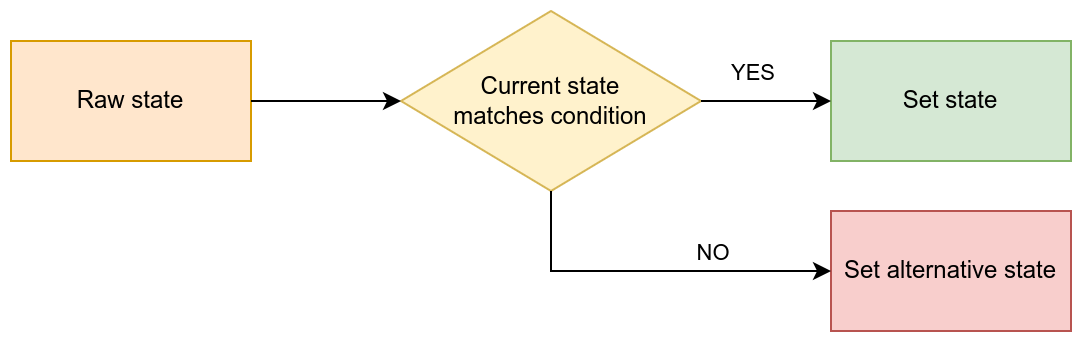
In example, let us update sensor value if the sensor is in working state. In case if the sensor is in error state, set the value to zero:
{
  "status": 1,
  "value": 100,
  "status_compare": 1,
  "status_else": 1,
  "value_else": 0
}
On modified
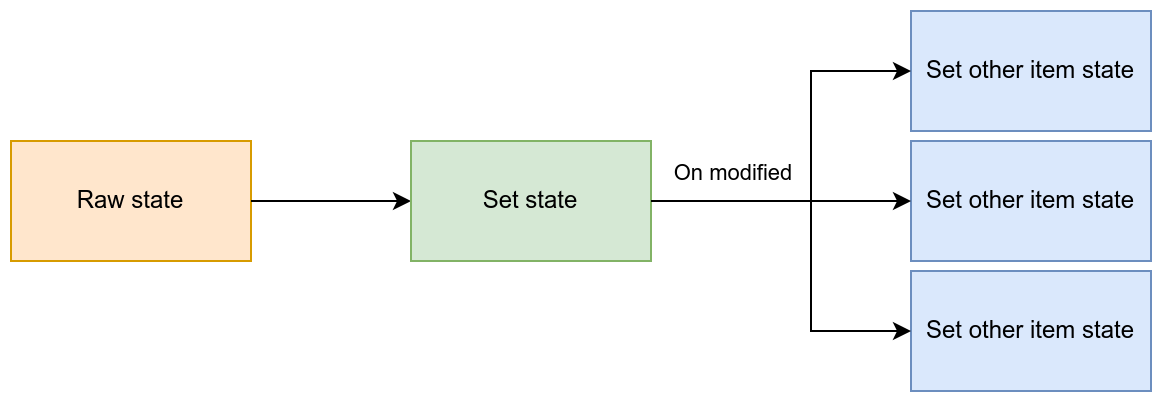
In case if the item state is updated, additional instructions can be provided to the core to manipulate states of other items.
Set other
In case if the item state is updated (note: this requires REAL update, in case of forced update the condition is not met), set states of other items to specific status/value.
{
  "status": 1,
  "value": 100,
  "on_modified": {
    "set_other": {
        "oid": ["sensor:tests/s1"],
        "status": -1,
        "value": 0
    }
  }
}
In case if the item state is modified, the core sets items with the specified OIDs (OID masks can be also used) to status -1 (error) and value 0.
Set other value delta
In case if the item state is updated (also applies for force updates), set the value of other item to the delta between the previous and the new value of the item the raw event is applied to.

{
  "status": 1,
  "value": 100,
  "on_modified": {
    "set_other_value_delta": {
        "oid": "sensor:tests/s1",
    }
  }
}
In case if force field is specified, its value is inherited for the sub-operation.
set_other_value_delta can contain additional sub-fields:
period apply formula to the delta: delta / elapsed * period. Useful to measure dynamic values, such as speed or acceleration.
on_error in case if the item which delta is recorded into has got error status, apply the following:
skip to skip the operation
reset set the status to 1 and value to 0
process (default) to process the operation
on_negative in case if the delta is negative, apply the following:
skip to skip the operation
reset set the status to 1 and value to 0
process (default) to process the operation
overflow re-calculate the delta. The field is an object with the mandatory sub-fields: floor - minimum value and ceil - maximum value. The ceil value is usually exclusive. The formula used is (ceil - previous) + (current - floor).
A real example: consumption metering
Basic metering
Consider there is a consumption sensor which increases its value from 0 to 999 999. The data is sampled every 5 minutes and we need to record the real consumption (deltas).
The sensor sensor:meters/m1 is updated with the following raw event (sent to RAW/sensor/meters/m1 EAPI bus topic):
{
  "status": 1,
  "value": 100,
  "force": "update",
  "on_modified": {
    "set_other_value_delta": {
        "oid": "sensor:meters/m1_delta",
        "on_error": "reset",
        "on_negative": {
             "overflow": {
                  "floor": 0,
                  "ceil": 1000000
             }
        }
    }
  }
}
force field is set to update to ensure the meter state is recorded even if not changed, for accounting purposes. This also ensures the core will generate an event for the delta sensor even if the delta value is not changed. This is important, if the data from database is used to summarize the consumption for a period.
In case if the meter is overflown (the value is reset to 0), the delta sensor respects the overflow and re-calculates the delta using the floor and ceil parameters provided.
In case if the delta sensor is in error state, the core resets the status to 1 and sets the value to 0.
Handling meter replacement
The on_error rule allows to cheaply introduce additional functionality: in case if the meter sensor is physically changed and the new one starts counting from different starting point, the first delta is ignored.
To implement this, let us introduce a new sensor sensor:meters/m1_id which contains the meter ID (e.g. serial number). When the sensor is replaced, the new one must immediately report its ID (it is also a good idea to report the ID periodically, to ensure the core ID matches the real one):
Topic: RAW/sensor/meters/m1_id
Payload:
{
  "status": 1,
  "value": 123456,
  "on_modified": {
    "set_other": {
        "oid": ["sensor:meters/m1_delta"],
        "status": -1,
        "value": 0
    }
  }
}
Now, if the meter is replaced, the core will reset the delta sensor to 0 and set its status to -1 (error). As deltas updated with on_error: reset rule, the first delta will be ignored.